
Revit Families: A Comprehensive Guide
October 25, 2025
Written by BIM Outsourcing
Introduction
The approach professionals adopt today to plan, design, and construct buildings in the Architecture, Engineering, and Construction (AEC) industry has evolved with the assistance of Revit. The basis of this evolution lies in Revit Families, which are parametric (whose parameters can be altered) or customisable building elements such as furniture, doors, walls, windows, and structural parts.
This blog will provide you with a comprehensive insight into Revit Families, their role in the design process, their types, creation, and management, as well as their contribution to elevating your project to a top-tier level and making it more efficient and flexible.
What Are Revit Families?
Revit Families are the primary elements of a Revit model that serve as representations of different components used in constructing a building such as doors, walls, furniture, windows, and MEP fixtures. Revit Families consist of two essential parts: parameters and geometry. Parameters are defined values or properties that can be adjusted such as dimensions and material of the element. Geometry refers to the appearance or shape of the element. In short, parametric Revit Families are those elements whose geometry adapts to parameters, eliminating the need for resketching from the start while creating flexibility for element modifications within a model, ensuring consistency and saving time.
Types of Revit Families
Based on their purpose, Revit classifies families into three main types:
- System Families
System Families refer to the built-in elements within Revit such as walls, roofs, floors, and ceilings. They play a key role in creating the structural framework of a building, but they offer limited customisations. For instance, you can adjust the height and thickness of a wall but cannot create it from scratch the way you can with other family categories. System Families cannot be copied from one project to another; to use them, you must recreate them.
- Loadable Families
As the term “Loadable Families” indicates, these families can be loaded into Revit. Unlike system families, they allow you to customise them using the Family Editor and use them in other projects without recreating them with the same parameters, offering flexibility and modifications according to project needs. They include elements such as doors, furniture, walls and windows.
- In-Place Families
Custom elements that you create directly within a particular project and that have no use in other projects are known as In-Place Families, such as a wooden bench created in Revit using the Model In-Place tools. You can modify these elements but cannot load them into other project files.
Importance of Families in BIM Workflow
In Building Information Modelling (BIM), "Families" are pre-designed items or objects, such as windows, doors, or beams, which are utilised across a project. Families help to ensure the project looks consistent, leading to a streamlined design and construction process. Families allow automatic quantification of materials and scheduling, thus saving time and reducing errors. They help to ensure everything looks the same, behaves consistently, and works together visually and functionally. With BIM progressing to higher levels, such as BIM Level 2 and beyond, well-structured Families enable the exchange of information between teams and the detection of issues, such as clashes between building elements, before construction begins.
Family Templates and Categories
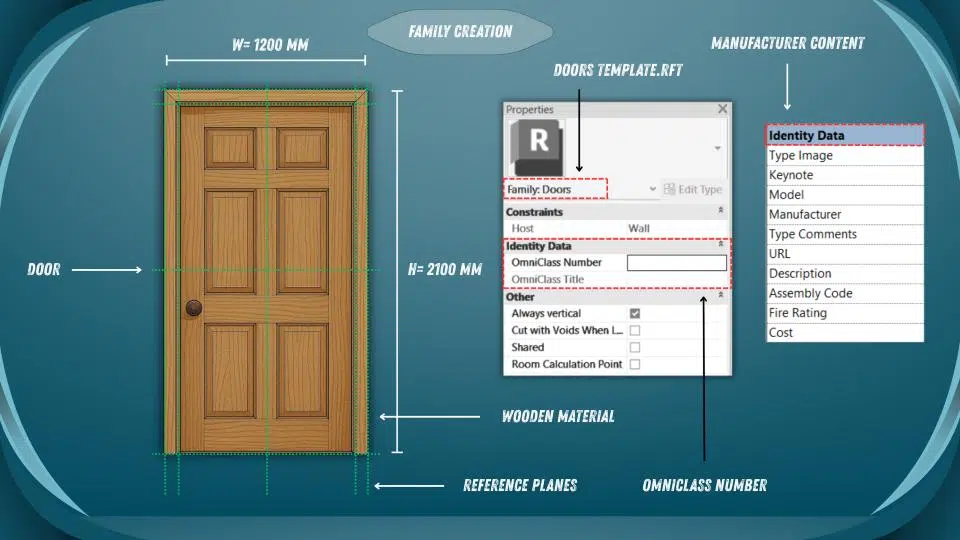
Selecting the right template while creating a loadable family is a crucial step because the template provides an outlook of the object you are modelling and guides its behaviour in the project. The format for the template file is .rft. For instance, Metric Door.rtf or Metric Furniture.rtf. Templates are preset to ensure smooth integration with Revit tools such as tags, filters, and schedules. That’s why choosing the right template helps the family fit and function correctly, operate according to your expectations, and align with project requirements.
Key Parameters in Revit Families
- Type Parameters
As the term type parameterindicates that it is something related with type. For instance, changes in parameter such as height or length of a door or an object will tend to implement those changes in the entire project having doors with the same type.
- Instance Parameters
Instance parameters allow users to make changes in a specific object without affecting others of similar kind. For instance, It enables you to assign each door a different sill height or number having same type.
- Shared Parameters
Shared parameters, as the name implies, can be used in multiple projects repeatedly without the need to create them from scratch, keeping the information consistent within a project. They are used for tags, filters, and schedules in Revit projects.
Creating Custom Families
To model a customised parametric loadable Revit family, first initiate the process by opening the respective software and selecting File > New > Family. The next step is to choose an appropriate template file depending upon your design requirements, such as doors, windows, or furniture elements. For ease, use reference planes for guidance, create the geometry, and assign parameters to it to control size and materials. Once everything is done, test the family by changing its dimensions and parameters to check if it works or not, a process known as flexing.
Best Practices for Family Creation
When it comes to modelling parametric families in Revit, it is crucial to consider some practices throughout your workflow to ensure your project is well-organised. The practices are as follows:
- Always use Purge to remove any unused parameters or geometry to make the file clean and lighter.
- Assign elements to different subcategories to easily control visibility in views.
- To ensure consistency, follow the naming conventions as instructed in the ISO 19650 standard.
- Inclusion of details about manufacturers and product codes is seen as one of the most important practices for post-construction operations such as facility management.
- Model only what’s needed in the geometry to keep the file size lighter.
Family Standards and QA/QC
Before using Revit families in your real-time projects, review their working accuracy by creating a checklist highlighting each important property or characteristic they must possess. The checklist can include items like:
- Can the dimensions be altered through parameters?
- Has each component been properly materialised?
- Are the parameters responsive when altered?
- Is the geometry clean and light?
After ticking off the points above by checking in the Family Editor Preview and Family Types, use the families in your projects.
Revit Families and Interoperability
In the construction industry, many software programs and standards are used, so it is essential to model Revit families in a way that they can be easily accessed on other platforms; this process is known as interoperability. To ensure this, one needs to add proper IFC classifications for data exchange, COBie information for facility management, and Uniclass or OmniClass codes for consistent element naming. By doing so, this approach makes sure that the data you share in the form of Revit families can be easily used and interpreted by others.
Conclusion
Revit families have become the basis for the success of an AEC (Architecture, Engineering, and Construction) project in modern times. They assist stakeholders in saving time and minimising errors by creating digitally powered, accurate, flexible, and consistent models. By leveraging appropriate templates, parameters, and standards such as IFC, COBie, and Uniclass, experts can ensure interoperability across different platforms. In brief, mastering and incorporating Revit families into your projects can make them smarter, more efficient, and easier to execute on-site without delays or costly overruns.